Lab 1: Basics — Packet Sniffing and Spoofing [7 points]
These exercises are based heavily on those developed at Seed Labs.
You may work with a partner on this lab.
The instructions, hints, and rubric are oriented toward Python with Scapy, but you are encouraged to write the lab in C if you would like the lower-level experience — you will build the packets and handle the raw sockets more directly, which is a good exercise in its own right.
Choosing a target
For Exercises 1 and 2 you will need a target host to ping and trace. Any reachable host with a public IP or domain works for this lab. For example 8.8.8.8, google.com, or dartmouth.edu are fine targets. Pick a target that responds to ICMP (some hosts drop it), and keep in mind that the route and round-trip times you see will depend on the target you choose and the network you run from.
VM set up
Follow these instructions to set up the VM and Docker containers for this lab. You can complete Exercises 1 and 2 without the VM, but you should complete Exercises 3 and 4 in the VM instead of on a live network. Make sure you only run your code from Exercises 3 and 4 on a network you control! You may run into legal trouble if you run it on a network you do not control!
Exercises
-
[1 point]
Pingis a tool that repeatedly sendsICMP requestpackets to a target IP address and listens for replies. Hosts that receive an ICMP request packet may reply with anICMP replypacket (although some hosts may not reply). When an ICMP reply is received from the target, the sender knows the target is reachable and can determine the time that it takes packets to make a round trip to the target and back.You can use Scapy to write your own Ping tool in Python (read more about Scapy), or you can avoid Scapy by using sockets in Python, or you can write it C. Your program should take a target IP address or domain as a command line parameter and should repeatedly send ICMP requests once per second to the target. You can use Scapy's
sr1command to both send a packet and receive a reply for one packet as shown:reply = sr1(<your packet here>)
replyis filled by Scapy with the reply packet. If there is no reply,replyis set to None after a brief timeout period.Set and increment the ICMP
seqfield on each packet so that successive requests carry increasing sequence numbers 1, 2, 3, … Scapy defaults this field to0, so a naive loop sends packets that are identical (e.g., not incrementing sequence numbers). Capture your own traffic in Wireshark using Linux's built-inpingcommand and confirm theseqfield is actually changing. (Also look at the ICMPidfield while you are there and note what value the packets carry.)Your
pingprogram's output should match the built-inpingcommand's output, which prints anicmp_seqfor each reply.Record the average round trip time for your
pingmethod by saving the time right before sending the packet and comparing it with the time right after the reply returns (e.g., when thereplyvariable is set by Scapy in the code above).Questions: How did you resolve the domain name to an IP address — what function did you call, and what does it do? Looking at your
pingin a Wireshark capture, what value did theseqandidfields hold in your packets, and how did that compare with the built-inping's packets? If they differed, why? Report the average round-trip time you measured to your target, and explain any difference between your measured RTT and the one the built-inpingreports. How could you make your code run faster?Submit your code, a short Wireshark packet capture (
.pcap/.pcapng) showing your program's traffic alongside the built-inping's traffic to your target, and a pdf with your answers to the questions above. -
[1 point]
traceroute(tracerton Windows) is tool to find the path a packet takes as it traverses the Internet from a source machine to a target machine. In this problem you will write your owntracerouteprogram. Your program should take a target IP address or domain name as a command line parameter.To see the route taken by packets from the source to the target we will use the
ttl(time to live) property of packets. Thettl(sometimes called the hop limit) specifies the maximum number of hops a packet can make between computers on the Internet before timing out. Each time a packet hops from one host to the next, thettlis decremented by 1. Packets time out if thettlgoes to zero and the host timing out a packet should send an ICMP error message (type 11, code 0) back to the original sender. For example, if sender of a packet setsttl=1, the packet would traverse to the first host on its way to the target, but that first host would not forward the packet on to the next host on the Internet because thettlwould be decremented to 0. Instead of forwarding the packet, the host should send back an ICMP error message including its name in the reply (although some hosts do not include their name and some hosts do not even send a reply! In the old days, most hosts were polite and would reply. Today, many do not).We can use Scapy to create an
ICMPpacket on top ofIPand set thettlproperty. To implement thetraceroutecommand, set the firstttl=1. Get a error message reply from the first hop. Then setttl=2and get a reply from the second hop. Keep incrementing thettluntil your get a reply from the destination. Use Scapy'ssr1command as described above to send an ICMP packet (you may want to settimeout=2as a parameter insr1in case a host does not send back the ICMP error message, in that casesr1will timeout in 2 seconds). Keep track of the hosts that replied along the route.Stop incrementing the
ttlwhen either you receive a reply from the destination itself (an ICMP echo reply, type 0, whose source address is your target) or you reach a maximum of 30 hops (indicating the destination was unreachable or did not reply). A hop that does not answer is normal — print it as a*and keep going rather than stopping at the first silent hop.NOTE: Dartmouth seems to block ICMP replies. To test your code, connect to an off campus network perhaps via your phone (make sure you are not VPN'd into Dartmouth when you do).
NOTE for Windows hosts: If you run the VM on a Windows machine, you may find that a packet sent with
ttl=1immediately returns a reply whose source address is the destination (e.g., you ping your target withttl=1and instantly get a reply claiming to be from the target, even though you are obviously not one hop from it). This happens because the VM's default NAT networking mode lets the hypervisor/Windows host answer ICMP itself instead of forwarding your packets to real routers, so the per-hop TTL expiry never reaches the physical network. This is not a bug in your code. Two ways to deal with it:- To see a real multi-hop route: change the VM's network adapter from NAT to bridged mode, which puts the VM directly on the physical network so real routers decrement the
ttland send the Time Exceeded messages. Campus networks (802.1X / MAC registration) will often reject a bridged VM, so test bridged mode on a home network or a phone hotspot, where it generally just works. - If you cannot use bridged mode: your program will simply see the destination's source address in the reply at the first hop, so the stop condition above (stop when the reply's source is the target) will fire and your program will terminate correctly — it will just report a one-hop path. That is expected under NAT; you are not being penalized for the environment.
To tell which situation you are in, run your operating system's own
tracert(Windows) ortraceroute(Mac/Linux) to the same target first. If the built-in tool also collapses to a single hop, the interception is in your environment (NAT/host), not in your code.Questions: Paste the hop-by-hop route your program discovered to your target. Did any hop fail to reply (show up as a
*)? Pick one such hop from your output, if any, and explain what likely happened there and how you can tell from your data. What could cause an inconsistency in the route you discover, and how likely is that to happen during a single run of your program? Run your program twice to the same target and report whether the route changed.Submit your version of the
tracerouteprogram using a ICMP packet sent to each host along the way (do not simply call Scapy's built-in traceroute routine!). Include the terminal output showing the route your program discovered to your target, and the answers to the questions. - To see a real multi-hop route: change the VM's network adapter from NAT to bridged mode, which puts the VM directly on the physical network so real routers decrement the
-
[2 points] Steal telnet passwords. Telnet is a protocol that sets up a virtual terminal between two computers, allowing a user on one computer to type commands into a remote computer. Telnet communicates using TCP on port 23. Unfortunately, however, telnet sends each character typed by the user to the remote computer in clear text over the network, including login user names and passwords. The remote computer echoes keystrokes back to the sender in plain text. Because this network traffic is unencrypted, we can sniff those communications and recover the user's credentials.
Only run this code in the VM! Assuming you followed these instructions, you will have the following network in your VM, where each machine is a separate docker container. Follow those instructions to get a terminal on each container (machine) inside your VM.
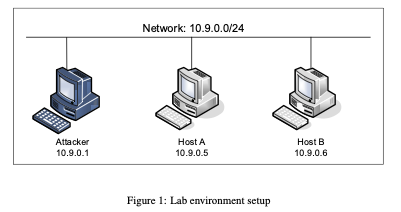
- Attacker: 10.9.0.1
- Host A: 10.9.0.5
- Host B: 10.9.0.6
- Network: 10.9.0.0/24
A user sets up a telnet session by typing:
telnet <ip address of remote computer>
telnet 10.9.0.6to connect to Host B on 10.9.0.6. Host B will then ask for the user's user name and password. Each keystroke typed by the user is sent over the network in the clear (e.g., not encrypted). Once authenticated, the user can issue commands in a shell on the remote computer.Write a program to sniff the username and password keystrokes. You'll need to use two Docker containers. Run your sniffer on the attacker computer (10.9.0.1). The attacker computer is configured in the VM to see all network traffic. Issue the telnet command from Host A to Host B (use the command ifconfig to get the computer's IP address). Telnet sends each character typed by the user in one packet. For example, if the user types a username of "seed" (which is the username on the containers, "dees" is the password), telnet will send a packet with a data value of 's', then another packet with a data value of 'e', then a third packet with a data value of 'e', finally a fourth packet with a data value of 'd'. Intercept these packets with Wireshark to verify one packet per character typed. You can get the data values in a sniffed packet using Scapy by looking at the
Rawlayer. Print keystroke characters as they are typed, but do not print other packets exchanged or extraneous data (just keystrokes including return characters).Questions: Why does telnet echo keystrokes back to the sender? From your own capture, explain how you distinguished the characters the user typed from the characters the server echoed back (both cross the attacker's interface) — which packets did you keep, and how did your filter decide? Should you ever use telnet to connect to computers? What else could you use, and why might the alternatives be better?
Submit your sniffer program and sample output that clearly identifies the username and password captured. Because remote computer echoes each keystroke, make sure your output only includes one of each username and password character (e.g., seed, not sseeeedd). Also include a .pdf of the answers to the questions.
-
[3 points] ARP poisoning and MiTM. As discussed in class, each host maintains an ARP table that maps IP addresses to MAC addresses. If a host does not know the MAC address of another host, it sends an ARP Request including the sender's MAC and IP addresses and the unknown host's IP address. The Request is sent to broadcast so all hosts on the LAN see it. The host with the requested IP address responds with an
ARP Replythat includes its IP and MAC addresses. Helpfully, any host that sees an ARP Reply (even if did not send an ARP Request to the reply's IP address) will update its ARP table to the MAC address contained in the ARP Reply. Unfortunately for us, hosts will only update existing entries in their ARP table when they see an ARP Reply, hosts will not create a new entry. We will have to deal with this limitation. But, ARP Request and Replies are not authenticated, so anyone can spoof an ARP Reply frame. We will do so in this exercise.Only run your code in the VM! See the note above about potential legal trouble if you run this code outside the VM.
Some helpful information:
- You can get a host's MAC and IP address by issuing
ifconfigfrom a terminal on that host. You will want to get the MAC of the attacker container and the MAC of Host A - The adversary's interface that can see all network traffic begins with
br-, you will see it withifconfigon the attacker container - Each time you start your VM, the MACs will change, so if you write your code one day, shut down the VM, then restart, each host will have a new MAC (annoying for us, but that is what the VM does!)
- You can see the fields you can set in Scapy with
ls(Ether|IP|ICMP)(choose either Ether for Layer 2, IP for Layer 3, or ICMP for ping fields).
Steps:
-
Before running your code issue a
arp -ncommand on Host A (10.9.0.5). You will see all the ARP IP/MAC mappings Host A has (initially probably none). - From the attacker's machine (10.9.0.1), choose a random IP address (but still on the network, use something like 10.9.0.7). Send a spoofed ping to Host A, setting the source IP address to your random IP address. This step will cause Host A to create an entry in its ARP table for the spoofed IP address. Check this entry exists with another
arp -non Host A. You should see an entry with your fake IP address and incomplete for the MAC. At this point Host A knows about your IP address, but hasn't seen an ARP Reply, so it makes an incomplete entry in the ARP table. - Spoof an ARP Reply frame so that target Host A's ARP table maps an IP address of your choosing to the attacker's MAC. Show that your command works by using
arp -nand see that your random IP address now maps to the attacker's MAC. Once your spoofing code is working, create a Man in The Middle (MiTM) attack where Host A maps Host B's IP to the attacker's MAC, and Host B maps Host A's IP to the attacker's MAC. This will allow the attacker to see all traffic between Host A and B. To do so, spoof Host A as above, then spoof Host B similarly. Once Host A and B have ARP entries, sniff telnet traffic between them on the attacker computer and capture the username and login as you did in Exercise 3 above. In a network that uses a switch, the attacker computer would not normally see traffic from A to B and vice versa — the switch would look at Host A's traffic and forward it directly to Host B's MAC (e.g., a switch does not broadcast frames like a hub does). Now Host A will mistakenly address frames to the attacker's MAC when it sends to Host A's IP address and the same goes for Host B's IP address. On Host A, telnet to Host B and capture the username and password on the attacker computer. Note that frame forwarding is turned on in the Docker container. So when a frame arrives at the attacker's computer from Host A with Host B's IP address, the attacker's computer will assume the frame was delivered by mistake and will forward the frame to Host B's MAC address. This forwarding means that telnet from Host A to B will function as usual and Host A and B will not detect that the attacker is in the middle. Hint: you will likely need to
sleepfor about one second between the spoofed ping and the spoofed ARP reply. Figure out why: remove the sleep, rerun, and observe what the ARP table on Host A looks like when it fails versus when it succeeds. Your answer to the question below should explain the ordering that makes the sleep necessary.
HINT: you'll want to send the ping at Layer 2 using Scapy. Use Scapy's
sendpcommand to make sure Scapy does not overwrite your Layer 2 settings. Scapysendcommand (note no 'p' in that send command) sends at Layer 3 and overwrites Layer 2 settings. Also, make sure to include the interface! (If the interface is not included in thesendpcall, Scapy will not send the ping and will not give an error.) Finally to delete a mapping typearp -d <ip address>.Question: Why is the
sleepbetween the spoofed ping and the spoofed ARP reply necessary? Explain using what you saw in Host A's ARP table with and without it.Submit your code and terminal output (screenshots or a short screen recording) that shows, in order: Host A's ARP table before the attack, the incomplete entry after your spoofed ping, the poisoned entry after your spoofed ARP reply, and finally the full MiTM with both Host A and Host B poisoned and the telnet credentials captured at the attacker. The per-boot MAC addresses of your containers should be visible in the output (run
ifconfigorip addronce and include it) so the ARP entries can be tied to your specific VM session. - You can get a host's MAC and IP address by issuing
Submission instructions
Create a single .pdf file with your answers to the questions in the exercises above. Include in that pdf (or alongside it in the zip) the required evidence for each exercise: the Exercise 1 packet capture, the Exercise 2 discovered route, the Exercise 3 sample sniffer output, and the Exercise 4 staged ARP-table output. Zip your code files together with your .pdf and captures into a single file and submit that file via Canvas. In the text box on your Canvas submission, provide the name of your partner. Both partners should submit the same code.
For each source code file, make sure you include a header comment that lists the file, author, course, assignment, date, and description. Include any AI assistants you used to create or modify your code. For example, include something like:
# ==============================================================================
# File Name:     ping.py
# Author:        <Your name here>, assisted by Claude Code
# Course:        CS60: Computer Networks
# Assignment:    Lab 1: Packet sniffing and spoofing
# Date:          September 29, 2026
#
# Description:   Implements a ping program described in Lab 1, Exercise 1.
#
# ==============================================================================
Grading rubric
Total points: 7
Exercise 1 [1 point]: Ping
- 1 point: Create and send ICMP packets to a target with an increasing
seqnumber once per second until the program is terminated; receive the reply and print in the normal ping format including round-trip time; handle missing replies by printing "No reply". Submit a capture comparing your traffic with the built-inping, and answer the questions (domain resolution, observedseq/idfields, measured RTT).
Exercise 2 [1 point]: Traceroute
- 1 point: Create and send ICMP packets, increasing the
ttlby one each packet; record the hosts along the way, keep moving if no response, stop at the destination or after 30 hops. Include the route discovered and answer the questions (unreachable hops, route consistency).
Exercise 3 [2 points]: Steal telnet passwords
- 1 point: Create a sniffer callback function with a filter to capture only telnet packets
- 1 point: Capture username and password without duplicate characters, and answer the questions (echo, typed vs. echoed characters, telnet alternatives)
Exercise 4 [3 points]: ARP poisoning and MiTM
- 1 point: Spoof an ICMP ping to Host A with an IP address of your choosing so that Host A holds an (incomplete) entry for your IP address in its ARP table
- 1 point: Spoof an ARP reply that sets that entry in Host A's ARP table to the attacker's MAC
- 1 point: Create a MiTM where Host A maps Host B's IP to the attacker's MAC and Host B maps Host A's IP to the attacker's MAC, and sniff the telnet username and password between Host A and B. Submit the staged ARP-table output (with per-boot MACs visible) and answer the question about the
sleep.